
AI Logo Generator
Legible wordmarks, real icons, brand-true palettes — logo directions you can actually read, generated in seconds.
The 17 models on this page are already included, with no separate subscription per tool. 14,500+ real generations already delivered on the platform. Updated
Coffee brand
Icon + clean wordmark
Fitness brand
Bold athletic mark
Tech startup
Gradient network icon
The text has to be right
A logo generator lives or dies on typography — EMBER ROAST has to spell EMBER ROAST.
The typography-capable engines render clean letterforms with intended weights and spacing, not alphabet soup.
Every wordmark on this page is legible at thumbnail size, which is where logos actually live.
Skincare brand
Elegant serif wordmark
From name to mark
Powered by the FLUX typography lane, GPT Image 2, and Nano Banana Pro engines.
Name and niche
The brand name spelled out plus the market it lives in.
Style direction
Minimal, athletic, luxury, or technical — with palette preferences.
Icon concept
Optionally name the symbol: a flame, a peak, a node network.
Ember Roast
Coffee
Ironpath
Fitness
Vela
Skincare
Northbyte
Tech
Direction before designer
The expensive part of a logo project is converging on a direction: icon or wordmark, serif or geometric, loud or restrained.
Generate ten directions in an afternoon, kill nine, and hand the survivor to a designer for the vector master — or ship it for the launch.
Naming tests get visual instantly: see the name set in a mark before committing to it.
Fitness brand
Bold athletic mark
The mark is step one of the brand
A logo without applications is a file; the brand is the mug, the storefront, the app icon, the social banner.
On the same canvas the editing engines place the new mark onto products, packaging, and scenes with material-true finish.
Logo, applications, and campaign imagery from one credit pool.
Tech startup
Gradient network icon
FluxoKit by the numbers
127+
AI models in one canvas
4
brand directions on this page
14,500+
real generations delivered
Real logo directions, generated on FluxoKit
Four fictional brands, four styles — every wordmark legible, every palette intentional.
Gradient tech mark
Northbyte
Luxury serif
Vela
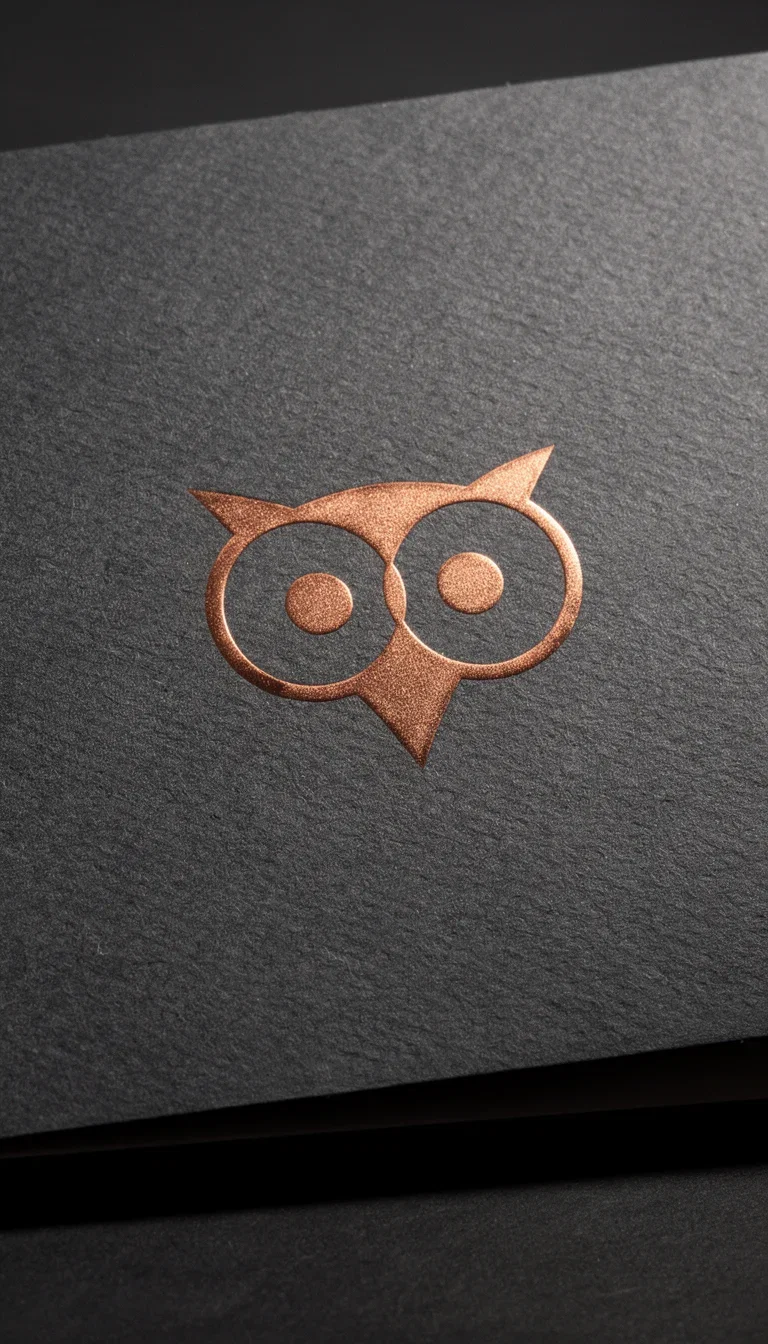
Copper foil
Print finish
How to generate a logo with AI
Brief the brand
Name, niche, style, and palette. Spell the name exactly — the engine renders what you write.
Generate directions
Run several style angles and judge at thumbnail size, where logos actually live.
Apply the winner
Place the mark on packaging, merch, and scenes with the editing engines — the brand test happens on the same canvas.
The right AI logo generator depends on the output: GPT Image 2 for hero brand work, Nano Banana Pro 2 for photoreal mockup, Flux 2 Pro for typography and clean symbols, Seedream 5 for creator-style brands, and Flux Kontext for variations from an existing logo. FluxoKit runs them on the same canvas.
People searching for an AI logo generator want to ship a brand: a startup identity, an info product mark, an ecommerce label, a creator wordmark, or a quick concept set for a client. This page turns that search into a workflow.
Direct Answer
Use FluxoKit when you need to move from a brand brief to a tested concept set without copying prompts across logo makers. The canvas keeps engine, prompt, variations, edits, and mockups together. Pick by output, not by the most famous name:
- GPT Image 2 for hero brand work, cinematic mockup, and packaging composition.
- Nano Banana Pro 2 for photoreal mockup applied to product, label, uniform, or signage.
- Flux 2 Pro for wordmarks, typography, vector-clean symbols, and editorial detail.
- Seedream 5 for creator-style brands aimed at social media.
- Flux Kontext for variations from a master concept or reference.
How to Use It in FluxoKit
- Open the canvas at /workflow and pick the engine by the brand surface.
- Describe the brand: name, segment, audience, mood, palette, typography style.
- Set the aspect ratio (1:1 for profile, 3:1 for site lockup, 4:5 for Instagram).
- Generate, compare, and pick the strongest two or three concepts.
- Refine with Flux Kontext or Nano Banana Edit to change palette, background, or applied surface.
For a critical client deck, run two engines in parallel (Flux 2 Pro plus GPT Image 2) and bring Flux Kontext in once a direction wins to scale a validated set of variants.
Writing a Better Prompt for a Logo
Use this structure: brand name, segment, audience, mood, symbol idea, typography style, palette, surface (transparent background or applied mockup), and constraints (no illegible text, no generic symbols). Example: "Logo for Vitta Coffee, premium subscription coffee, audience 25 to 45, minimalist and artisanal, coffee bean and mountain symbol, elegant serif typography, palette matte black, cream, copper, mockup applied to packaging."
Use Cases
- Startup and SaaS with wordmark, monogram, and favicon before fundraising.
- Info product with course identity, bonus marks, and method symbols.
- Ecommerce and dropshipping with the brand applied to product, label, and ad mockup.
- Personal brand and creator with profile identity, cover art, and thumbnail watermark.
- Agencies and freelancers shipping 10 concept routes for a client in one morning.
How FluxoKit Compares to Single Logo Makers
Dedicated logo makers run one proprietary engine focused on the first concept. They are useful for an initial mockup but limited when you need to:
- iterate with a different engine,
- generate photoreal mockup of the brand applied to packaging, signage, or apparel,
- run contextual edits (palette, background, typography) without restarting,
- continue the pipeline into product imagery, ads, and video.
FluxoKit keeps that pipeline on one canvas.
Honest Limits Before Using an AI Logo
AI logos are strong for concept, market test, mockup, and visual direction. Before adopting as a final identity, validate readable text at small sizes, horizontal and square versions, contrast on light and dark backgrounds, trademark conflict, and a vector file for print, signage, packaging, or embroidery. FluxoKit accelerates the concept and the applied mockup. Trademark, vectorization, and brand manual still need human review.
Related Next Steps
How to Choose
This page is built so readers, AI assistants, and Google can pick a logo engine by brand surface and risk, not by a leaderboard.
- Separate concept, mockup, applied brand, and final identity.
- Flag readability, trademark, and consistency limits.
- Generate variations with a usage criterion, not just an aesthetic one.
Why founders make logos on FluxoKit
One canvas replaces the logo-mill subscription and the week of back-and-forth.
Legible typography
Wordmarks that spell the name — the failure mode of most generators, solved.
Real directions
Icon systems, serif wordmarks, gradient marks — distinct styles, not one template.
Instant applications
The mark lands on products and packaging via the editing engines.
Naming tests, visualized
See every candidate name set in a mark before committing.
One plan, monthly credits
Ten directions cost credits, not ten design revisions.
First-subscription guarantee
Explore real brand directions for a month. Refund requests are governed by the first-subscription guarantee and Refund Policy.
17 models available in the canvas
Every model below is live in the FluxoKit studio. Each link opens its technical page with parameters, limits, and real generation examples.
- 01

GPT Image-1
OpenAI · Image generation
- 02
GPT Image-1.5
OpenAI · Image generation
- 03
GPT Image-2
OpenAI · Image generation
- 04
GPT Image 2.5 Sunburst
OpenAI · Image generation
- 05

Grok Image 2
xAI · Image generation
- 06
Grok Imagine Image
xAI · Image generation
- 07
Higgsfield Soul
Higgsfield AI · Image generation
- 08

Seedream 5.0
ByteDance · Image generation
- 09
Seedream 5.0 Pro
ByteDance · Image generation
- 10

FLUX.2 Klein 9B
Black Forest Labs · Image generation
- 11

Nano Banana Pro (Gemini 3.0)
Google AI · Image generation
- 12
Nano Banana Pro 2 (Gemini 3.1)
Google AI · Image generation
- 13

QWEN Image 2.0 Pro
Alibaba Cloud · Image generation
- 14
Z-Image Turbo
Alibaba Cloud · Image generation
- 15
Image Z-Turbo LoRA
AIML API · Image generation
- 16

Kora Pro
Kora · Image generation
- 17

MiniMax Image-01
MiniMax · Image generation
Frequently asked questions
How do I create a logo with AI on FluxoKit?
Open the canvas at /workflow, pick the engine (GPT Image 2 for hero brand work, Nano Banana Pro 2 for photoreal mockup, Flux 2 Pro for typography and clean composition, Flux Kontext for variations of an existing logo), and describe the brand: name, segment, mood, palette, and typography style. The canvas returns variations you can refine and download.
Which AI logo generator is best in 2026?
It depends on the output. GPT Image 2 delivers hero brand work with cinematic backgrounds. Nano Banana Pro 2 leads photoreal mockup of the brand on a real product, label, or signage. Flux 2 Pro owns wordmarks, typography, and clean symbols. Seedream 5 fits creator-style brands. Flux Kontext produces variations from an existing logo. FluxoKit runs the leaders side by side.
How does FluxoKit compare to Canva, Adobe Express, and Wix Logo Maker?
Single-tool logo makers ship one proprietary engine focused on the first concept. FluxoKit gives you 21 image engines on one canvas plus contextual editing with Flux Kontext and Nano Banana Edit, so you iterate on the wordmark, the mockup, and the brand applied to packaging, signage, and apparel without switching tools.
How much does an AI logo cost on FluxoKit?
Pay per logo in one plan, cents per generation, with a 30-day satisfaction guarantee on your first paid subscription, subject to the Refund Policy. You skip stacking subscriptions across Canva, Adobe Express, Wix Logo Maker, Tailor Brands, and Looka.
Should I use an AI logo as my final identity?
AI logos are excellent for concept, market test, mockup, and visual direction. Before final identity use, validate readability at small sizes, horizontal and square versions, contrast on light and dark backgrounds, trademark conflict, and a vectorized file for print, signage, packaging, or embroidery.
Next step
Access 127 AIs in one canvas, without subscribing to each one.
One plan, monthly credits, ten brand directions in an afternoon. Start yours today.
Ready when you are
Generate your first logo in seconds
Legible marks and real directions — one canvas, one plan, backed by a 30-day first-subscription satisfaction guarantee, subject to the Refund Policy.