
Higgsfield Face Swap
How landmark-tracked face swapping actually works — and how to run real identity swaps with the FLUX.2, Qwen, and character-swap engines on one canvas.
The 25 models on this page are already included, with no separate subscription per tool. 14,500+ real generations already delivered on the platform. Updated
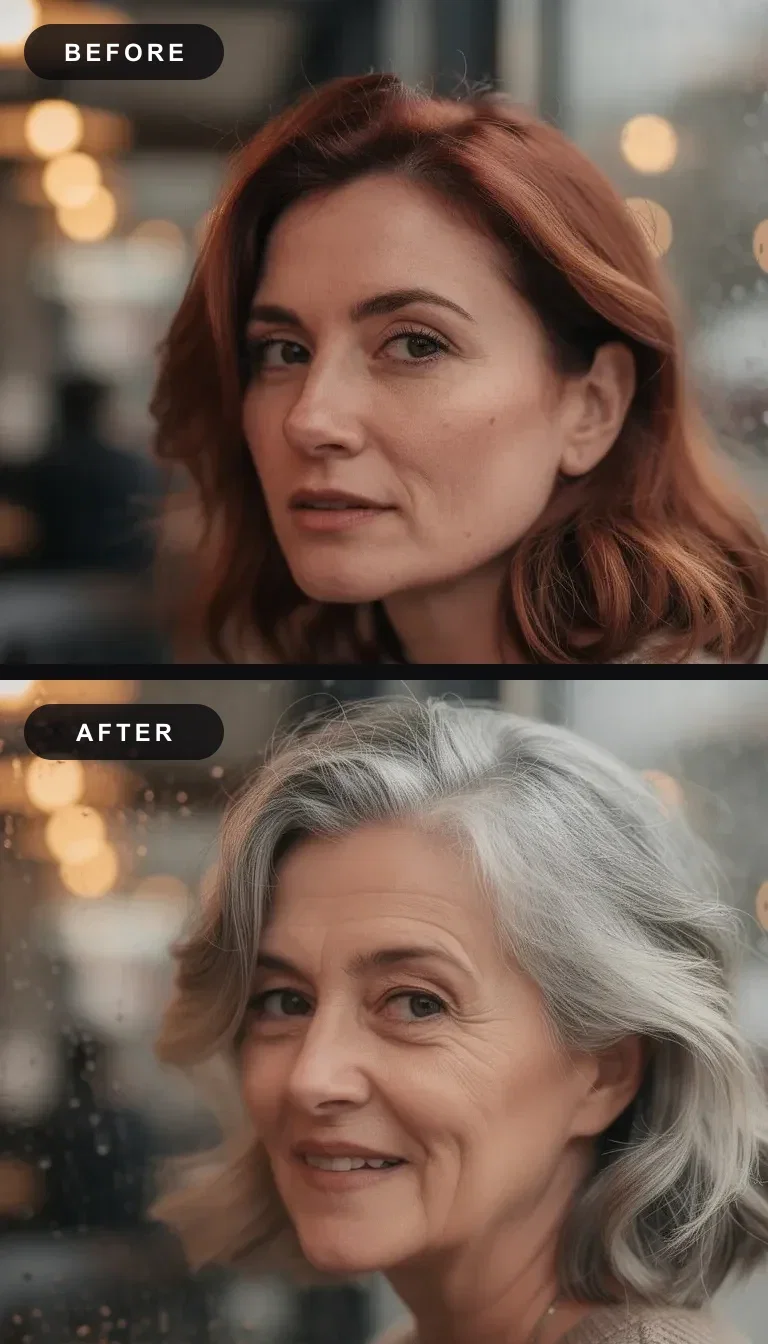
Before / after
Same cafe, new identity
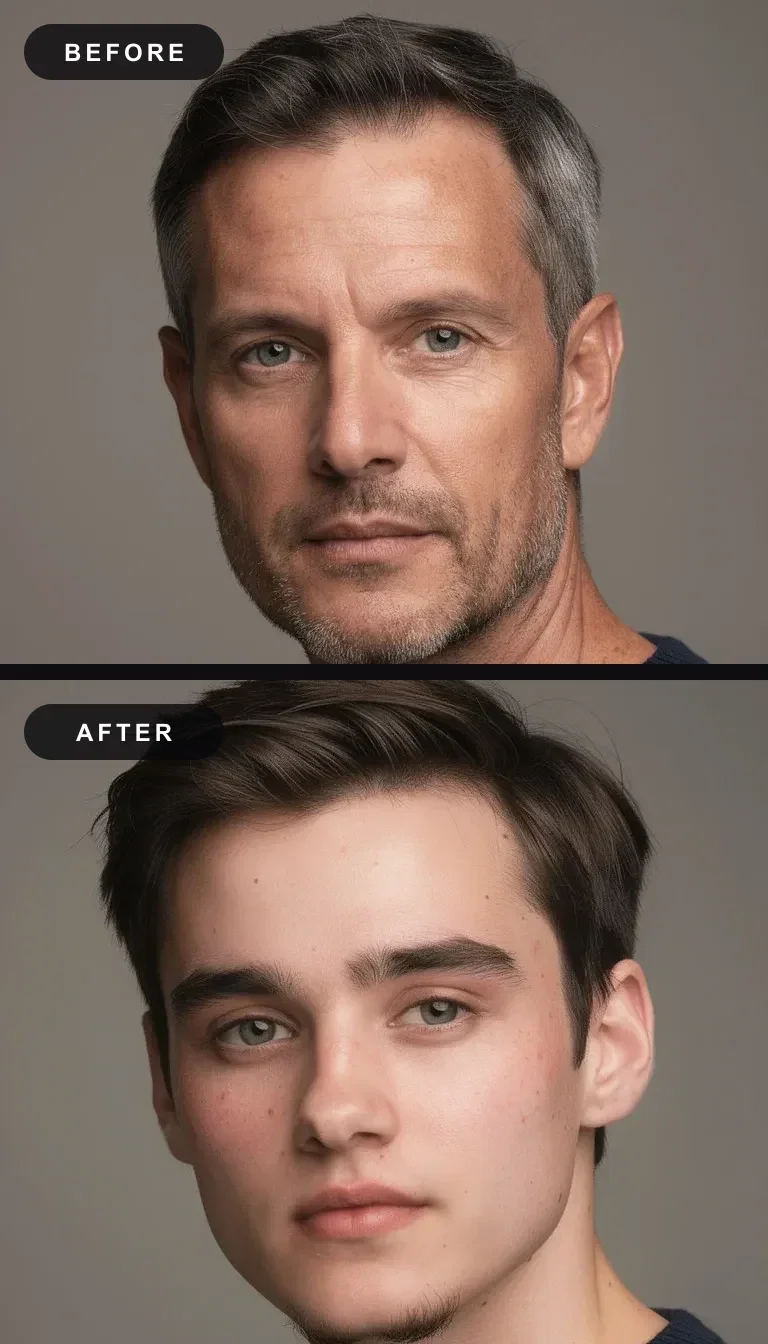
Before / after
Same studio, new identity
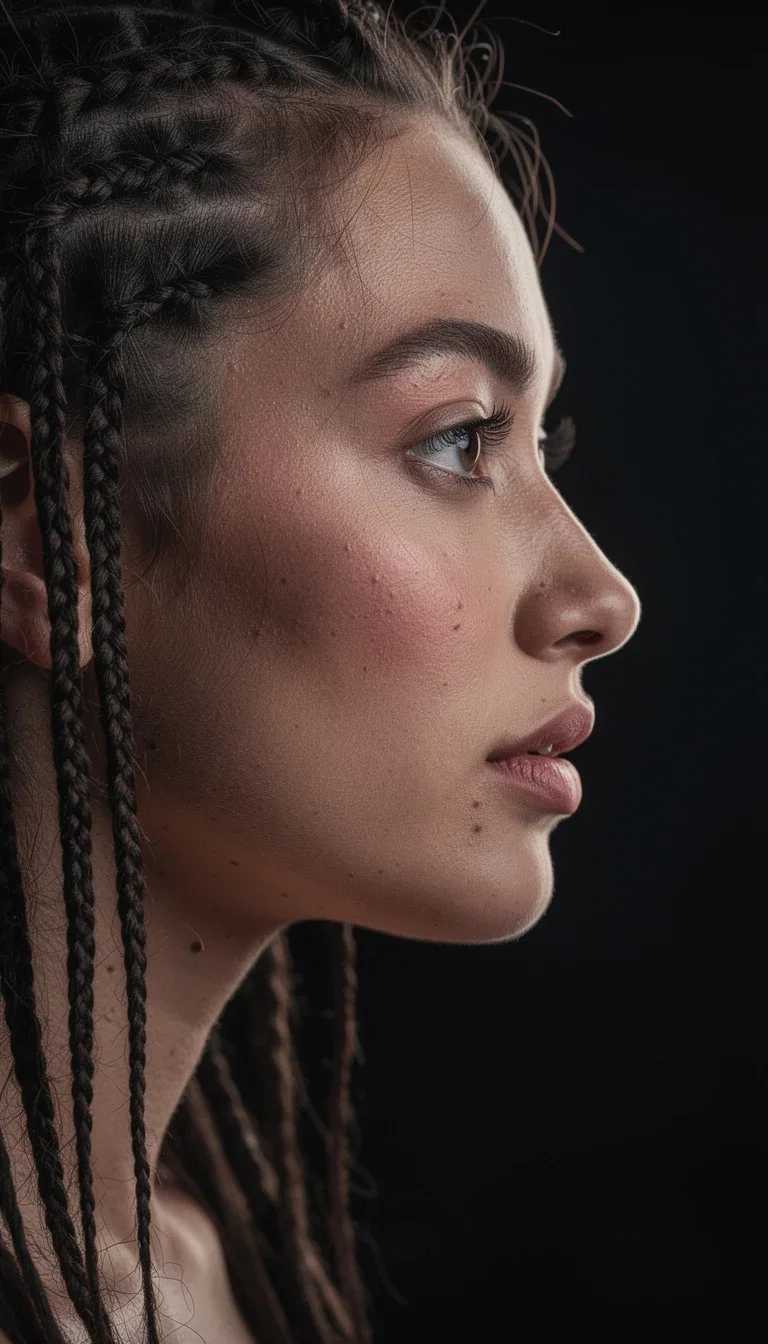
Hard case
Profile in side light
The swap has to survive the zoom
Both diptychs on this page are real identity edits: the same scene re-rendered with a different person, nothing else touched.
A convincing swap matches geometry, skin tone, and light — the jawline and hairline are where cheap swaps fall apart.
Run the edit, inspect at full size, and re-run with a better-matched source when a seam shows.
Before / after
Same cafe, new identity
Three ways to run a swap
Powered by the FLUX.2, Qwen Image Edit, and character-swap engines on FluxoKit.
Face swap
Source face in, destination in — the engine re-renders the scene with the new identity.
Character swap
Replace the entire person, not just the face — outfit, build, and presence included.
Identity edit
Describe the change in a sentence — age them up, restyle them, keep the scene locked.
Studio swap
Older to younger
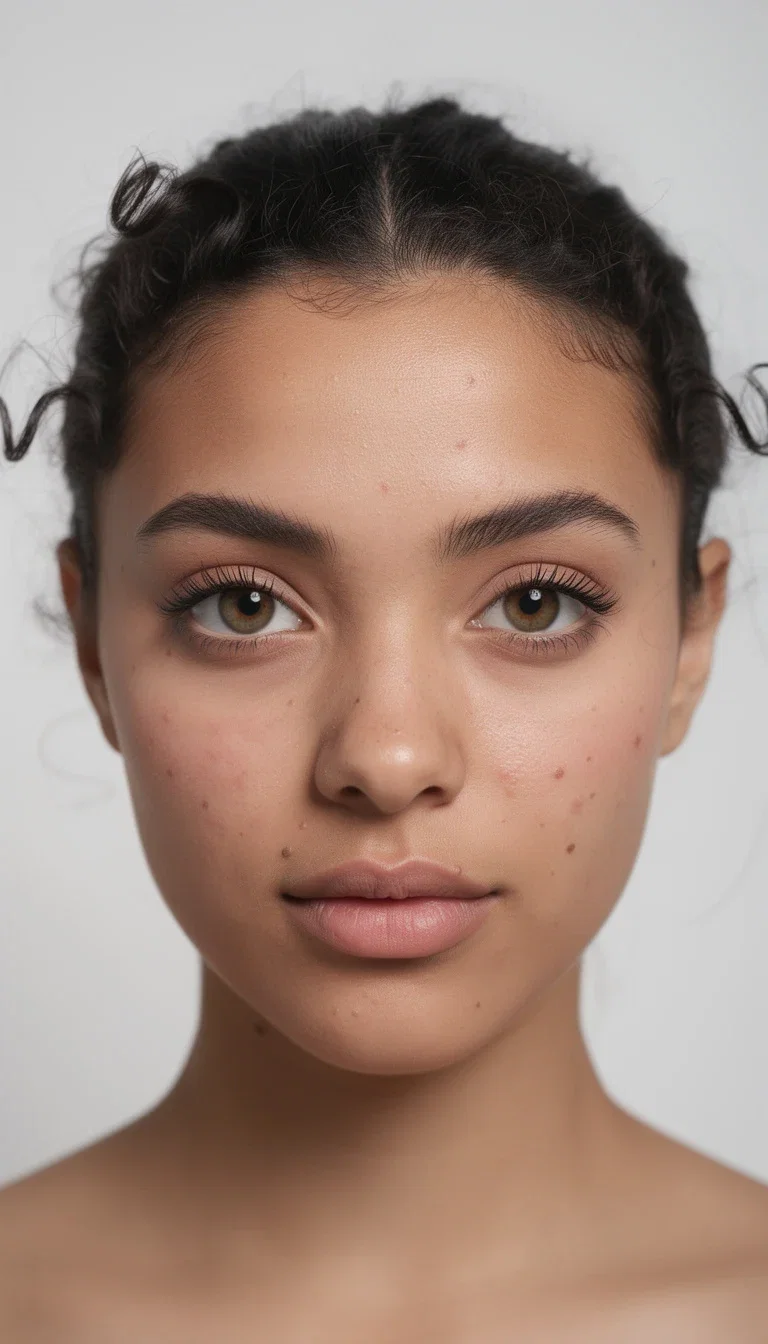
Source
Casting frame

Target
UGC selfie
Hard angle
Side-lit profile

Professional
Business headshot
The source photo decides the result
Feed the swap a sharp, front-lit source face near the destination's pose and every engine performs dramatically better.
A straight-on casting shot swaps cleanly into a straight-on frame; forcing it onto a hard profile makes the model invent structure.
That is why professionals keep a small library of source faces at different angles.
Source face
Casting headshot
Consent is the feature
Swap your own face, a consenting client's, or a generated identity that never existed — that is standard creative work.
Using a real person's face without permission violates likeness rights and platform rules, and FluxoKit's terms require rights to every uploaded face.
The professional pattern: build a consistent generated identity and carry it across the whole campaign.
Professional
Consent-first headshot
Face swap on FluxoKit by the numbers
25
swap and identity-edit engines on this page
137+
AI models in one FluxoKit canvas
14,500+
real generations delivered
Real identity work, generated on FluxoKit
Both before/after pairs are real edits — the same frame re-rendered with a new identity, seams inspected at full size.
Cafe pair
Identity swap
Target frame
Selfie realism
Stress test
Profile light
How to face swap without a Higgsfield subscription
Pick the source
A sharp, front-lit face near the destination's pose. Resolution honesty matters — seams show at the jawline first.
Run the swap
Face-only or full character swap, on the same canvas as the generators — one sentence, no masks.
Inspect and iterate
Zoom the jawline and hairline. If a seam shows, re-run with a better-matched source or angle.
Higgsfield face swap is one of the queries people reach after seeing an impossibly clean identity swap in a feed. The short version: Higgsfield offers photo and video face swapping — landmark tracking across frames, plus a Recast mode that replaces whole characters — inside its credit-metered creator platform. The part most searchers actually want, swapping a face cleanly into a photo or clip, also runs on FluxoKit from $14/month, next to every other image and video engine.
Direct Answer
Higgsfield's face swap takes a source face photo and a destination image or video, matches geometry, tone, and light, and re-renders the destination with the new identity. In video it tracks facial landmarks frame by frame, which is what keeps the swap locked through head turns and expression changes. Recast goes further and replaces the entire character. Access is through Higgsfield's subscription tiers, with credits metering each generation.
On FluxoKit, the same job runs through the AI Face Swap tool and the character-swap engines on the canvas: source face in, destination in, swap out — one plan, no per-tool subscription.
What Makes a Swap Hold
Three things decide whether a face swap reads as real. Geometry match — the source face angle should roughly match the destination head pose; a straight-on selfie swapped onto a profile shot forces the model to invent structure. Light agreement — harsh flash onto golden hour reads wrong no matter how good the blend is. Resolution honesty — a low-res source face upscaled into a 4K destination shows its seams at the jawline first.
Feed the swap a sharp, well-lit source face near the destination's pose and every engine — Higgsfield's or FluxoKit's — returns dramatically better results.
Consent Is the Feature, Not the Fine Print
The viral era of face swap comes with a hard line: use faces you have the rights to. Your own, a consenting client's, or a generated identity that never existed. FluxoKit's terms require rights to uploaded faces, and ad platforms increasingly reject undisclosed synthetic people in paid placements. The professional pattern is building a consistent generated identity — a face that never existed — and swapping or recasting that across a campaign.
Face Swap on FluxoKit
- Open the AI Face Swap tool or pick a swap engine on the canvas.
- Upload the source face — sharp, front-lit, matching the destination pose.
- Pick the destination image or clip.
- Generate, inspect the jawline and hairline at full size, and re-run with a better-matched source if a seam shows.
- For a full character replacement, use Character Swap instead of a face-only swap.
Related pages
- AI Face Swap — the FluxoKit tool page and workflow.
- Character Swap model reference — full-figure replacement, not just the face.
- Higgsfield AI on FluxoKit — the Soul image look that pairs with a locked identity.
- Higgsfield AI Pricing — what the Higgsfield platform itself costs.
Why creators swap faces on FluxoKit
Identity work next to every other engine a campaign needs.
Swap plus everything else
The swapped frame feeds the ad, the animation, and the thumbnail on the same canvas.
Face or full character
Face-level swaps and whole-character replacement both run from the model picker.
Generated identities
Build a face that never existed and reuse it across a campaign — the consent-clean pattern.
No per-tool subscription
One plan covers the swap engines beside 90+ image, video, and copy models.
Rights-first terms
FluxoKit's terms require rights to uploaded faces — the professional line, stated plainly.
30-day guarantee
Do real identity work for a month. Refund requests are governed by the first-subscription guarantee and Refund Policy.
25 models available in the canvas
Every model below is live in the FluxoKit studio. Each link opens its technical page with parameters, limits, and real generation examples.
- 01

Flux 2 Pro
Black Forest Labs · Image editing
- 02
Flux 2 Flex
Black Forest Labs · Image editing
- 03
Flux Kontext
Black Forest Labs · Image editing
- 04

Seedream 5.0 Edit
ByteDance · Image editing
- 05
Seedream 5.0 Pro Edit
ByteDance · Image editing
- 06
Seedream 5.0 Pro Reference
ByteDance · Image editing
- 07

GPT Image-1 Edit
OpenAI · Image editing
- 08
GPT Image-1.5 Edit
OpenAI · Image editing
- 09
GPT Image-2 Edit
OpenAI · Image editing
- 10
GPT Image 2.5 Sunburst Edit
OpenAI · Image editing
- 11

Grok Image 2 Edit
xAI · Image editing
- 12
Grok Image Edit
xAI · Image editing
- 13

QWEN Image Editor Plus
Alibaba Cloud · Image editing
- 14
QWEN Image Editor Max (New)
Alibaba Cloud · Image editing
- 15
QWEN Image Editor 2.0 Pro
Alibaba Cloud · Image editing
- 16

Nano Banana Pro Edit (Gemini 3.0)
Google AI · Image editing
- 17
Nano Banana Pro 2 Edit (Gemini 3.1)
Google AI · Image editing
- 18

Recraft Crisp Upscale
fal.ai · Image editing
- 19

Topaz Image Upscale
Topaz Labs · Image editing
- 20

MiniMax Image-01 Edit
MiniMax · Image editing
- 21
Flux 2 Pro Edit
Black Forest Labs · Image editing
- 22
Flux 2 Flex Edit
Black Forest Labs · Image editing
- 23
Flux 2 Klein 9B LoRA Edit
Black Forest Labs · Image editing
- 24
HY-WU Edit
HY-WU · Image editing
- 25
Flux Kontext Edit
Black Forest Labs · Image editing
Frequently asked questions
How does Higgsfield face swap work?
You upload a clear source photo of the face, pick the destination image or clip, and generate. The model cross-references facial geometry, skin tone, and lighting between the two, then re-renders the scene with the new identity. For video, it tracks facial landmarks frame by frame so the swap holds through motion and expression changes.
Can Higgsfield swap faces in video?
Yes. Higgsfield ships a video face swap that tracks the face across frames, plus a Recast tool that replaces an entire character rather than just the face. Both are part of its creator platform, metered by the same credit system as its image and video models.
Is Higgsfield face swap free?
Higgsfield has offered limited free daily credits for sampling, with real production sitting behind its paid tiers. FluxoKit does not sell a free trial: face and character swap run inside the platform plan from $14/month with monthly credits, backed by a 30-day first-subscription satisfaction guarantee, subject to the Refund Policy.
Is face swapping legal to use?
Face swap is a tool, and consent is the line. Swapping your own face, a client's face with permission, or a fictional generated identity is standard creative work. Using a real person's face without their consent can violate likeness, privacy, and platform rules. FluxoKit's terms require you to hold rights to the faces you upload.
How do I face swap without a Higgsfield subscription?
FluxoKit runs face swap and full character swap on the same canvas as its image and video engines — upload the source face, pick the target, and generate, with no separate Higgsfield account. See the AI Face Swap tool page for the exact workflow.
Next step
Access 137 AIs in one canvas, without subscribing to each one.
New purchases are temporarily paused. Existing purchased access and credits are unchanged.
IDENTITY WORK ON FLUXOKIT
Run your first face swap
Real swaps, honest seams, one canvas — backed by a 30-day first-subscription satisfaction guarantee, subject to the Refund Policy.